Operation
Once the OOB is installed on your edge device, the device will appear online in the Robots section of the Cogniteam platform.
Accessing the OOB Panel
-
Click on the device in the Robots list.
-
An overview page is shown, where you can see the Out-of-Band (OOB) box.

-
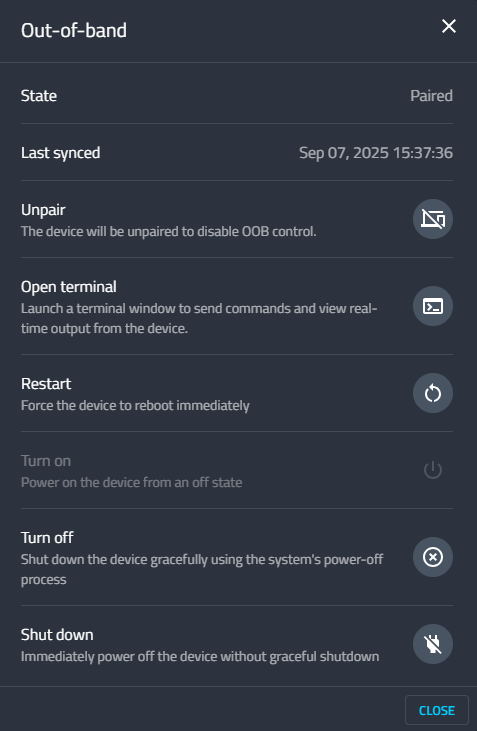
Clicking on the OOB box opens a floating operation menu.
Operation Menu Features
The operation menu provides direct control of your edge device through OOB technology. The available options include:
- State: Displays whether the device is paired or unpaired.
- Last Synced: Shows the last time the device synced with the platform.
- Pair / Unpair: Allows you to enable or disable OOB control for the device.
- Open Terminal: Launches a terminal window to send commands and view real-time output from the device.
- Restart: Forces the device to reboot immediately.
- Turn On: Powers on the device from an off state.
- Turn Off: Shuts down the device gracefully using the system’s power-off process.
- Shut Down: Immediately powers off the device without a graceful shutdown.
With these controls, administrators can perform remote maintenance, recovery, and system operations securely and efficiently, even if the device’s operating system is offline.
ERMI-Based Operations (Conceptual)
The OOB operations exposed in Cogniteam align with the Edge Remote Management Interface (ERMI) capabilities:
- Power State Management: Maps to Redfish/ERMI power control for on/off/restart.
- Serial-over-LAN Console: The “Open Terminal” action corresponds to the ERMI serial console, usable when the OS is unavailable.
- System Health & Events: Device health and sync state reflect controller-reported status; platforms may support event subscriptions for changes.
- Security & Access: When provided by the controller, sessions are protected via TLS and role-based access with token-backed authentication.
Learn more: ermi-open.org