Creating a Token
To use the API Gateway on the Cogniteam Cloud Platform, you need to create an authentication token. Follow the steps below to generate a token within your organization.
Prerequisites
- You must have a user in your Cogniteam Cloud Platform organization.
- Ensure that you are logged in to the Cogniteam Cloud Platform with the correct organization selected.
Steps to Create a Token
Log In to the Cogniteam Cloud Platform
- Open the Cogniteam Cloud Platform login page.
- Enter your username and password and select your organization (if multiple are available)
Access the User Profile
- Once logged in, navigate to the User Profile by selecting it from the user menu in the top-right corner of the home page.
Locate the API Token Settings
- In the User Profile, find the API Token section. This is typically under the main Settings.
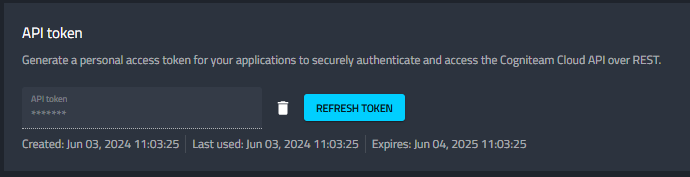
Generate a Token
- Click Generate to create the token.
Save the Token
- Once the token is generated, you will see a unique token string.
- Copy the token immediately and store it in a secure location, such as a password manager. ⚠️ Note: The token will not be displayed again for security reasons.
- Use this token to authenticate your API requests to the Cogniteam Cloud Platform.
Additional Notes
- Token Expiry: Some tokens may have an expiration period. Be sure to check the token settings for details.
- Token Revocation: If a token is compromised or no longer needed, you can revoke it in the same Profile section.
- The base URL for the API is:
- Global https://api.cognimbus.com/apigateway
- Asia region https://api.ap1.cognimbus.com/apigateway