Quick Start
Get up and running with the API Gateway V2 in minutes.
- Cloud
- Local
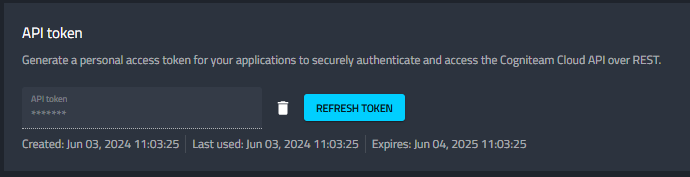
1. Generate Your API Token
- Log in to the Cogniteam Cloud Platform
- Click your profile icon in the top-right corner and open Settings
- Find the API Token section and click Generate
- Copy the token immediately — it will not be shown again
2. Exchange for a Bearer Token
Send your API token to the login endpoint to receive a bearer token:
curl -X POST https://api.cognimbus.com/apigateway/v2/auth/login \
  -H "Content-Type: application/json" \
  -d '{"userToken": "your_api_token_here"}'
Response:
{
  "token": "bearer your_bearer_token_here"
}
3. Make Authenticated Requests
Include the bearer token in the Authorization header of every subsequent request:
curl https://api.cognimbus.com/apigateway/v2/robots \
  -H "authorization: bearer your_bearer_token_here"
The bearer token may expire. If you receive a 401 Unauthorized response, repeat Step 2 to obtain a new token.
1. Enable and Secure the Local API
Use the HTTP or HTTPS address of the Nimbus agent on the local network. The default HTTP port is
19992:
http://<agent-host>:19992
Make sure the Agent security setting DisableLocalApi is false. A 403 response containing
"Local API is disabled." means the setting still blocks the API.
HTTP sends credentials and payloads without transport encryption. Use it only on a trusted network. Use HTTPS on an untrusted network and install or trust the Agent certificate; do not disable certificate validation in a production client.
2. Choose Authentication
If NoAuthentication is false, exchange the configured local Agent password for a bearer token:
curl -X POST http://<agent-host>:19992/apigateway/v2/auth/login \
  -H "Content-Type: application/json" \
  -d '{"userToken": "your_local_agent_password"}'
The response token already includes the bearer prefix:
{
  "token": "bearer your_local_api_gateway_token"
}
If NoAuthentication is true, skip login and omit the Authorization header. Protected Local REST
and WebSocket routes accept the request directly.
3. Call the Same Canonical Robot Route as Cloud
curl http://<agent-host>:19992/apigateway/v2/robots \
  -H "authorization: bearer your_local_api_gateway_token"
The local API uses the cloud-style plural /robots routes. Current agents retain singular
/robot routes only as compatibility aliases for older clients.
Recovery
401during login: use the configured local Agent password, not a Cloud API token.401after login: the token may have expired or the Agent may have restarted; log in again and replace the cached token.403: enable the Local API by clearingDisableLocalApi.- HTTPS or WSS certificate failure: install or trust the Agent certificate, or use HTTP/WS only on a trusted development network.